蛋白处理使用指南
本指南固定使用项目 tutorial-1A2C-thrombin,示例结构为 RCSB PDB 1A2C。目标是完成一次可复现的 CADD 蛋白准备流程:导入共晶结构、检查链和 HETATM 组分、选择参考配体、定义口袋、生成准备后蛋白资产,并把输出交给后续对接、FEP 和分子生成流程。
案例来源:RCSB PDB 1A2C,DOI: 10.2210/pdb1A2C/pdb。网页模块本身只展示开源代码和算法引用;教程案例来源只在本指南中说明。
本模块完成什么
- 导入 PDB ID 或本地 PDB/mmCIF 文件。
- 在 3D 视图中检查蛋白链、共晶配体、金属、水和其他 HETATM 组分。
- 从共晶配体或手动坐标定义 pocket asset。
- 删除不需要的链、配体、水或重复链。
- 生成
prepared_protein资产,供对接、FEP 和分子生成模块复用。
1. 打开固定 tutorial 项目
登录 admin / admin123456 后,在右上角项目菜单选择或创建:
tutorial-1A2C-thrombin
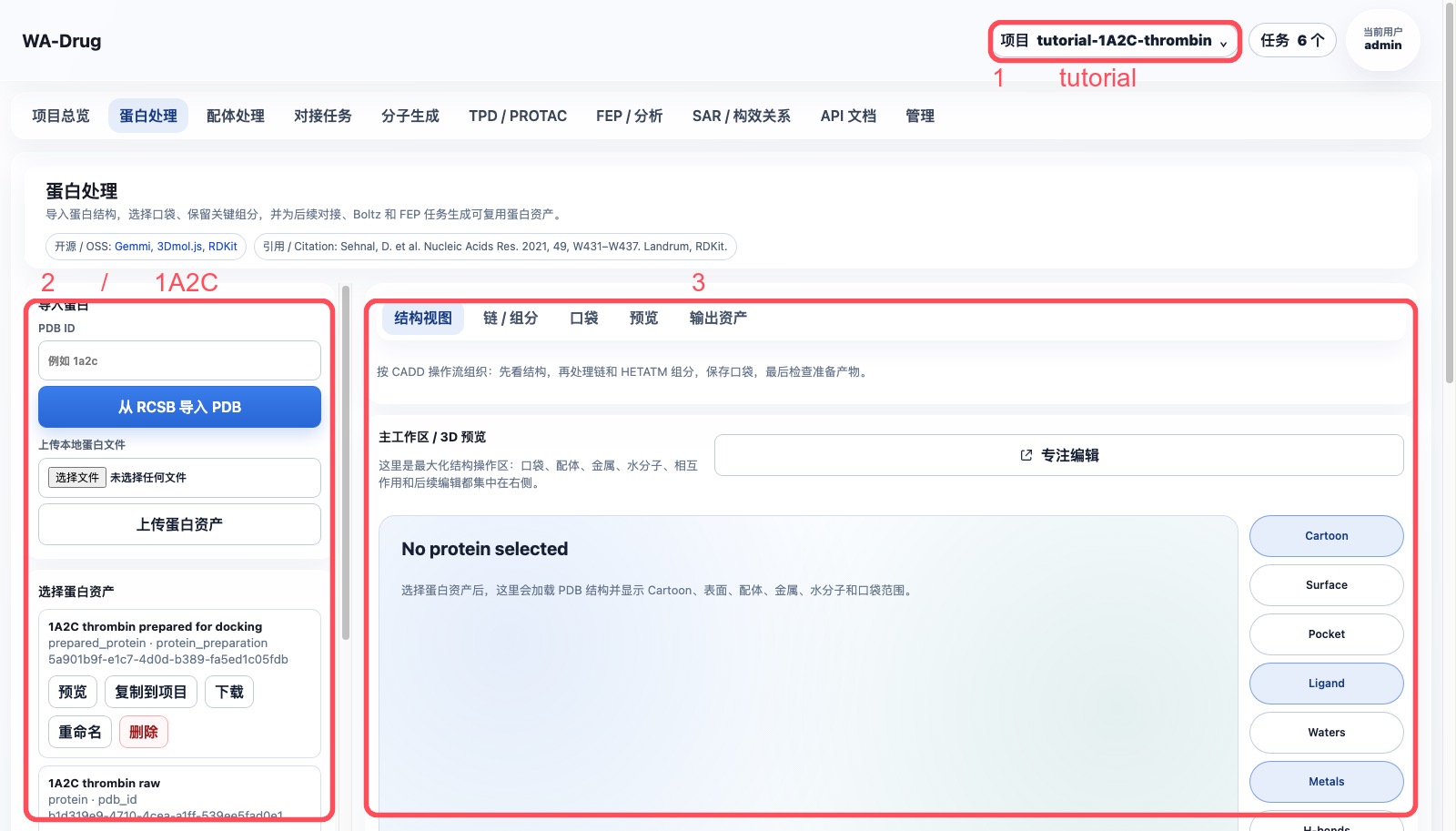
进入 蛋白处理 页面。左侧是导入和准备参数,右侧是 3D 主工作区。
2. 导入 1A2C 并选择蛋白资产
如果项目中还没有原始结构,在左侧 PDB ID 输入:
1a2c
点击 从 RCSB 导入 PDB。导入成功后,选择 1A2C thrombin raw,点击 预览。
推荐保留的资产命名:
| 阶段 | 建议名称 | 类型 |
|---|---|---|
| 原始结构 | 1A2C thrombin raw |
protein |
| 口袋 | PRJ J:3 active-site pocket |
pocket |
| 准备后受体 | 1A2C thrombin prepared for docking |
prepared_protein |
3. 检查链、配体和 HETATM 组分
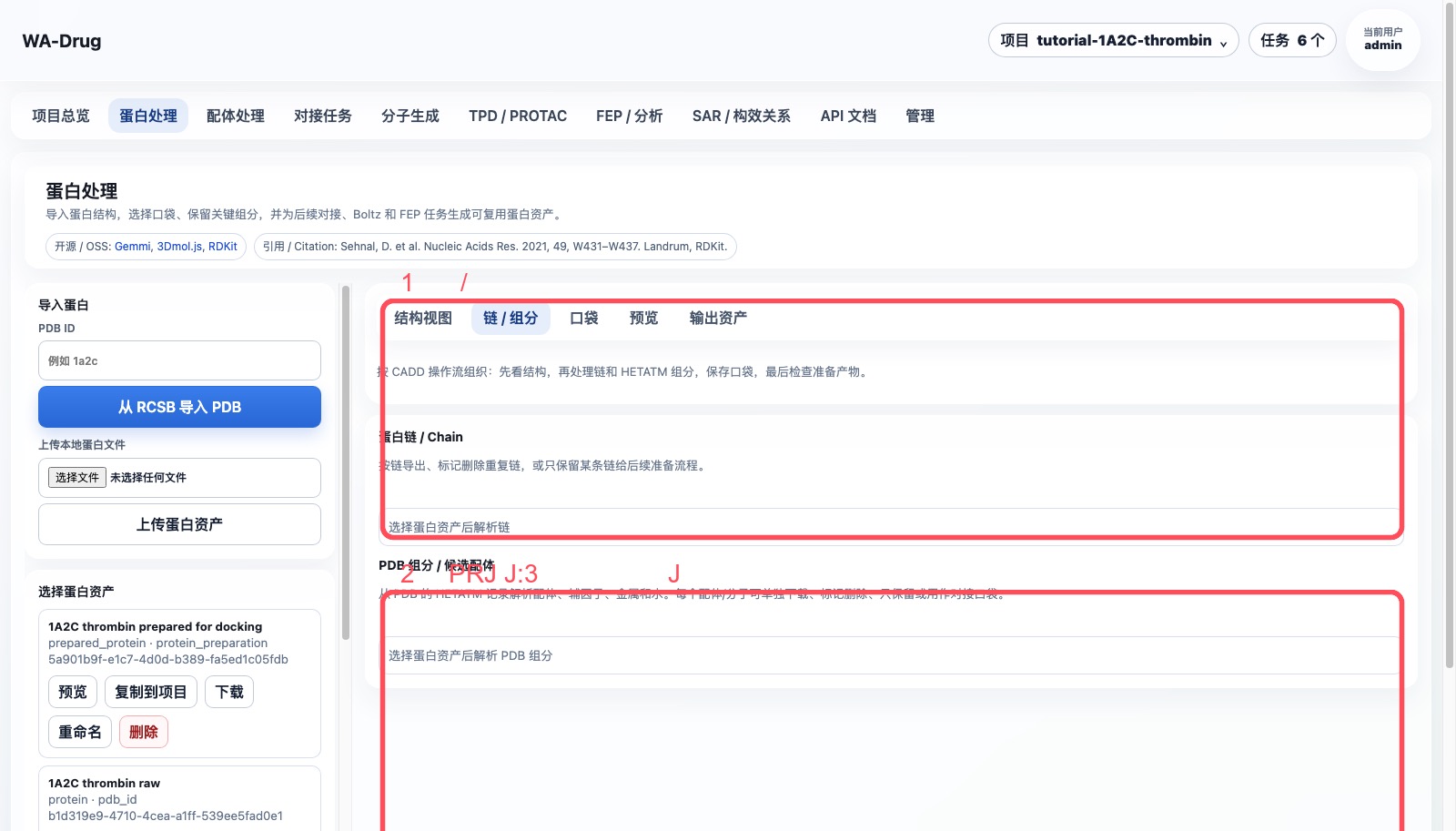
在右侧主工作区点击 链 / 组分。本例中关键对象如下:
| 对象 | 含义 | 建议处理 |
|---|---|---|
链 H / L |
thrombin 受体链 | 保留 |
链 J |
Aeruginosin 298-A 抑制剂链 | 定义口袋后从受体删除 |
PRJ J:3 |
抑制剂中部片段 | 推荐作为 pocket 中心 |
34H J:1、OAR J:4 |
抑制剂两端片段 | 可辅助确认口袋范围,可提取到配体库 |
TYS I:363 |
hirudin 片段中的修饰残基 | 不作为本例小分子口袋中心 |
NA H:626 |
金属离子 | 默认保留 |
HOH/WAT |
结晶水 | 默认删除,关键水另行保留 |
4. 用 PRJ J:3 定义口袋
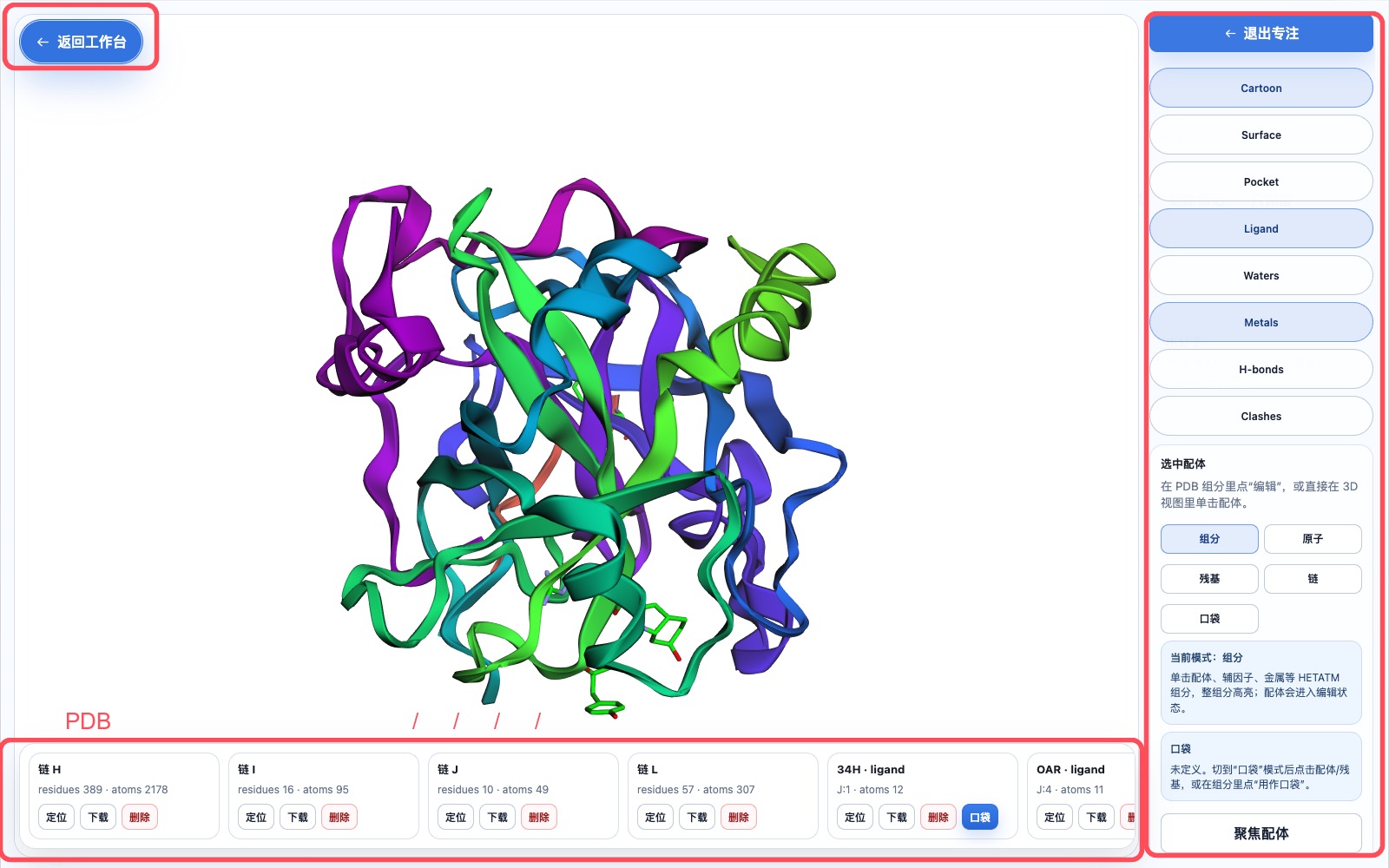
点击 弹出为专注编辑窗口,在底部横向 PDB 成分条找到 PRJ · ligand · J:3。
操作顺序:
- 点击
PRJ J:3卡片的定位,确认它位于活性口袋中。 - 点击
口袋或用作口袋。 - 打开右侧
Pocket显示。 - 将 box 设置为:
center = 18.54, -14.79, 20.56
box = 20, 20, 20 Å
如果要更保守覆盖整个 Aeruginosin 298-A 链,可改为 22, 22, 22 Å。调整中心和大小时应实时看到蓝色 box 覆盖共晶配体所在区域。
5. 准备受体
回到 蛋白处理 页面,在 CADD 蛋白前处理 中选择原始蛋白资产 1A2C thrombin raw。
推荐参数:
- 删除结晶水:开启。
- 保留金属离子:开启。
- 保留辅因子/共价配体:按任务需要开启;本例会删除原始抑制剂链
J。 - pH:
7.4。 - 删除链:
J;如果只研究 thrombin 小分子口袋,也可删除I。 - 参考配体/残基:
PRJ J:3。 - 输出名称:
1A2C thrombin prepared for docking。
点击 生成准备后蛋白资产。任务中心会出现 protein_preparation 任务,状态按步骤显示为进入队列、运行、完成或失败。
6. 输出如何进入后续步骤
完成后会得到两个核心资产:
prepared_protein:1A2C thrombin prepared for dockingpocket:PRJ J:3 active-site pocket
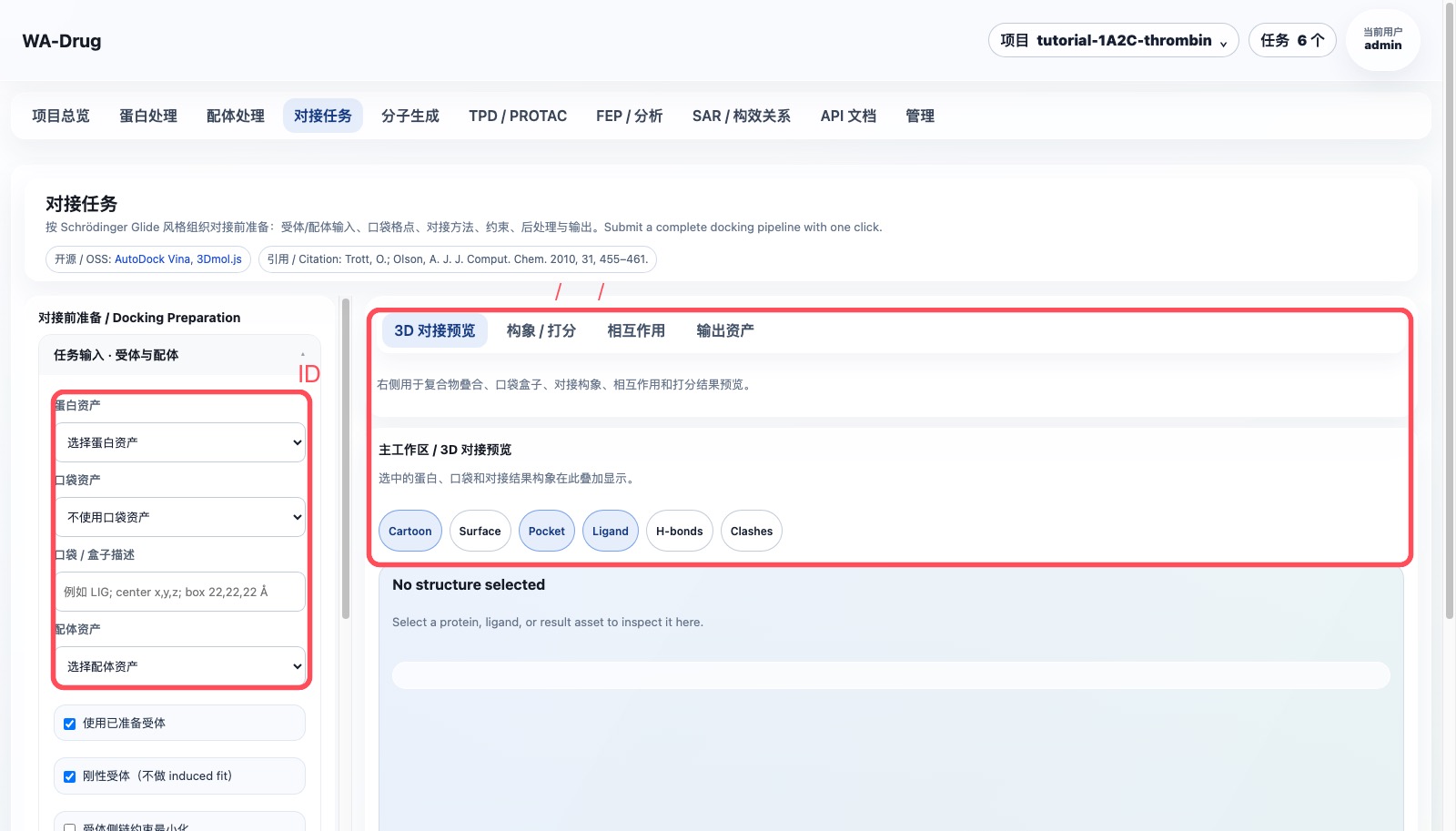
这些资产会在 对接任务 中以下拉列表按名称选择,不需要手填 ID。
7. 失败任务处理
如果任务失败:
- 打开右上角
任务。 - 点击失败任务的
查看进度,确认失败步骤和错误。 - 如果已经产生中间文件,点击
清理输出。 - 修正输入后重新提交;旧任务记录保留,方便追踪。
8. Server6 Example:1TA2 176 配体口袋
本例在 server6 的 Example 项目完成,靶点为 thrombin 复合物 1TA2,选择共晶小分子 176 A:401 作为参考配体和口袋中心。
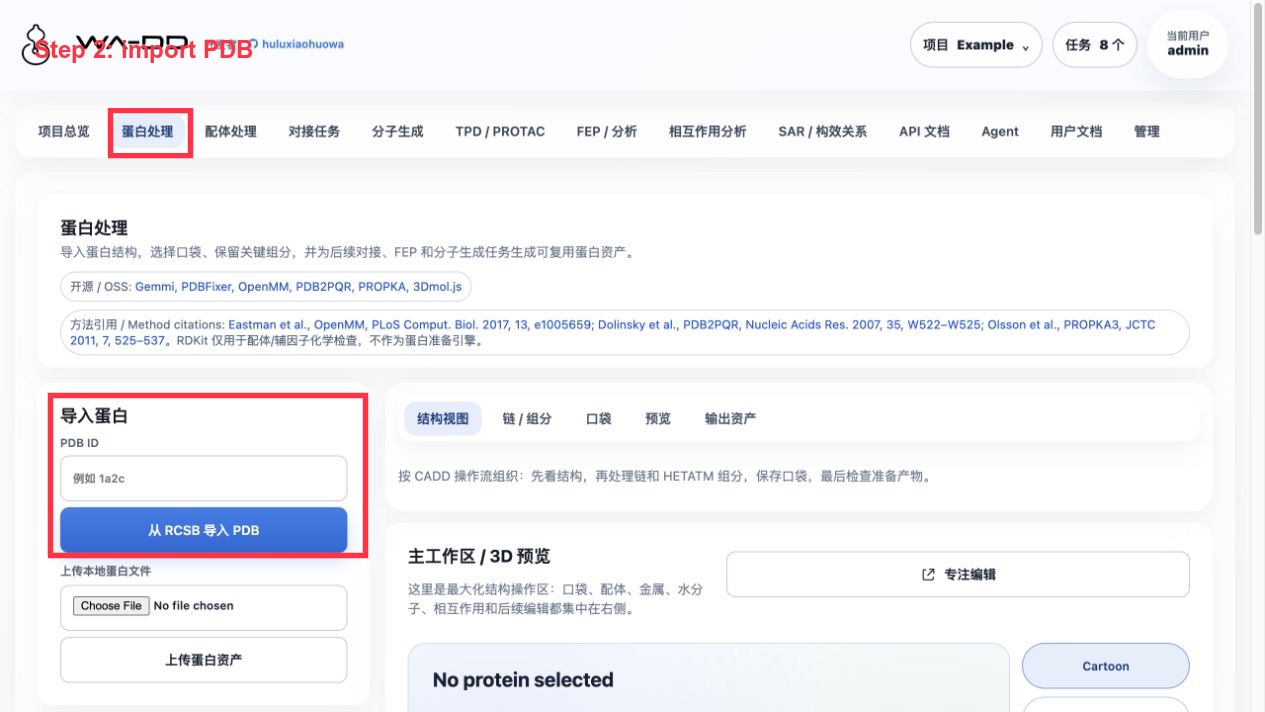
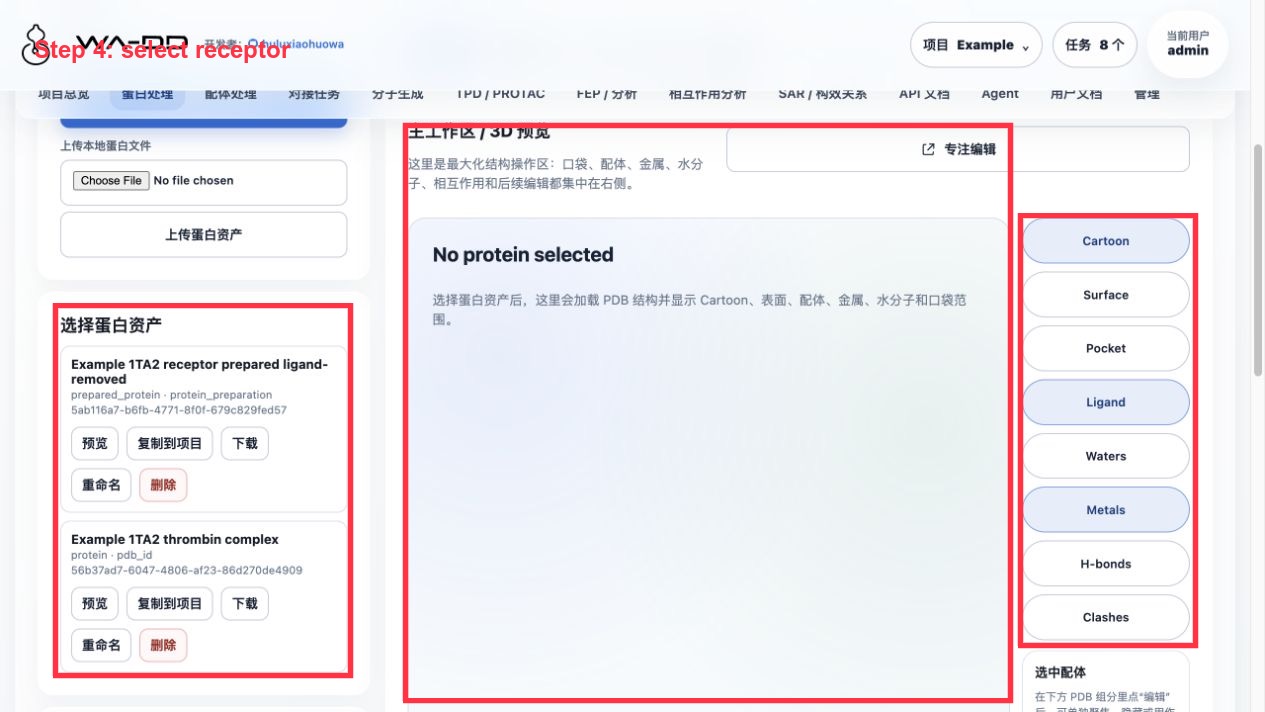
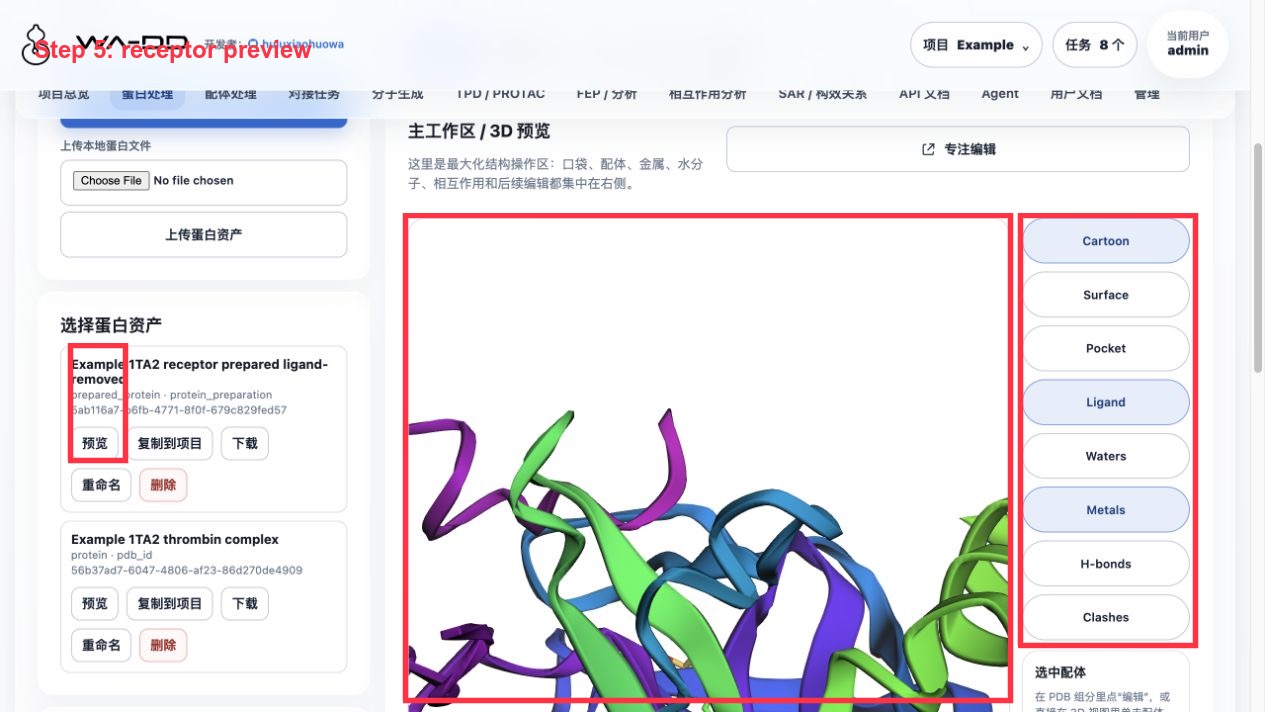
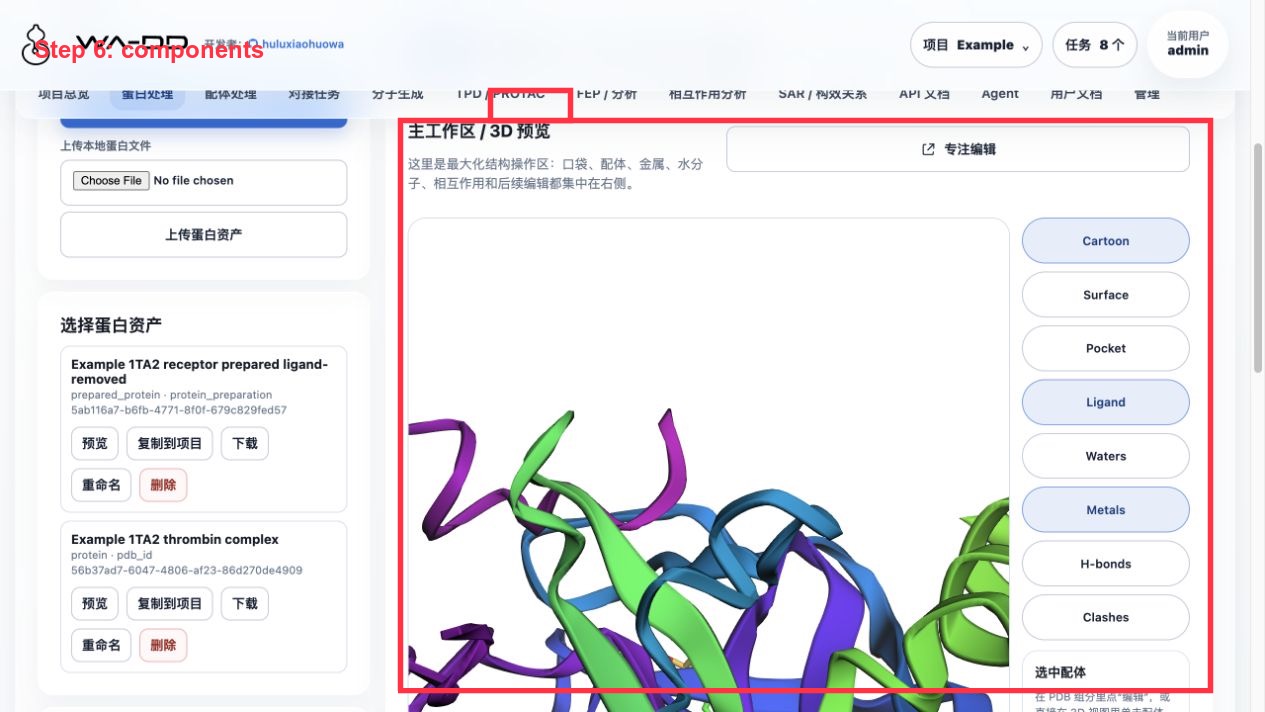
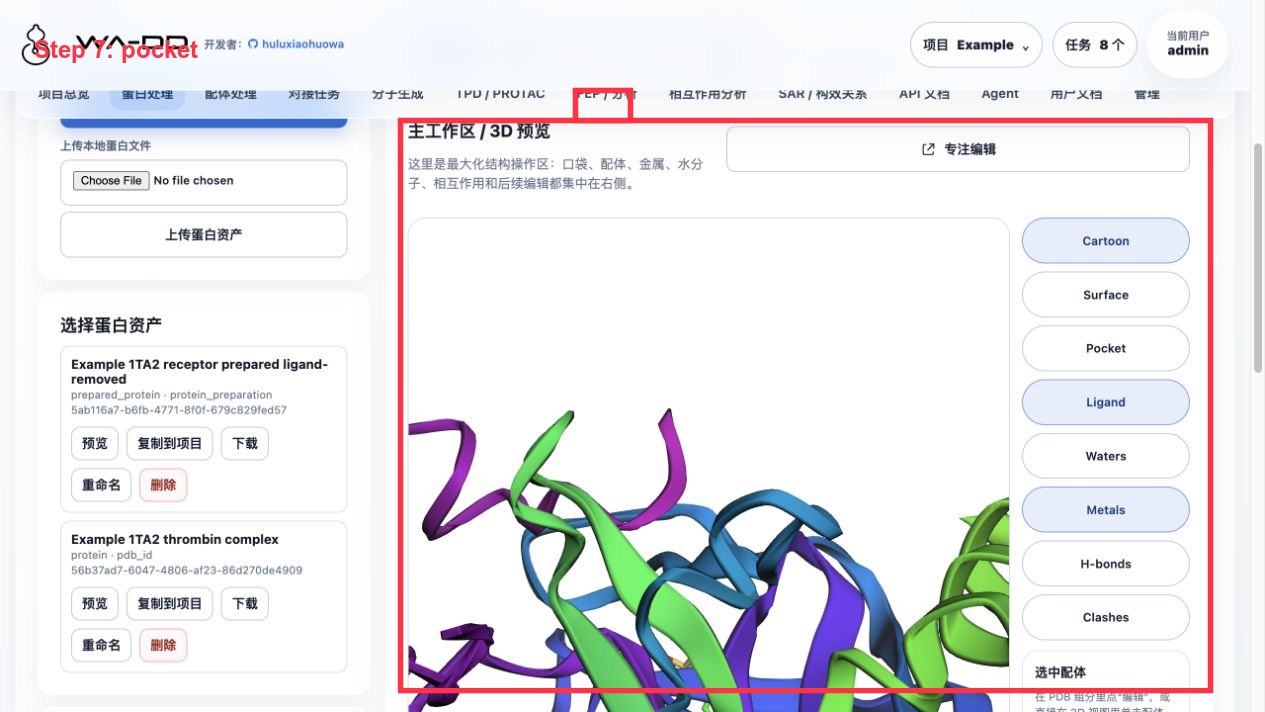
操作步骤:
- 进入“蛋白处理”。
- 从 PDB 下载
1TA2,命名为Example 1TA2 thrombin complex。 - 在组分列表中定位
176 A:401。 - 将
176 A:401提取为参考配体资产:Example 1TA2 reference ligand 176。 - 以
176 A:401为中心提取口袋资产:Example 1TA2 176 binding pocket。 - 运行蛋白准备,输出名为
Example 1TA2 receptor prepared ligand-removed。
本例准备参数:
- 删除结晶水:开启。
- 保留金属:开启。
- 保留辅因子:关闭。
- 添加氢:开启。
- 修复缺失原子:开启。
- pH:7.4。
- 从受体中删除参考配体
176 A:401,避免后续对接时口袋被原始配体占据。
结果检查:
- 准备后蛋白资产应为
prepared_protein,并且不再包含176 A:401。 - 参考配体作为单独 ligand 资产保留,可在配体处理、相互作用分析或后续 FEP 设计中复用。
- 口袋资产保存了 center、box size 和 pocket PDB,后续对接和分子生成都复用这一个口袋定义。
Protein Preparation Guide
This guide uses a fixed project, tutorial-1A2C-thrombin, and RCSB PDB 1A2C. The goal is to reproduce a complete CADD receptor-preparation path: import the co-crystal structure, inspect chains and HETATM components, select a reference ligand, define a pocket, generate a prepared receptor asset, and pass the outputs to docking, FEP, and molecule-generation workflows.
Example source: RCSB PDB 1A2C, DOI: 10.2210/pdb1A2C/pdb. The web module itself lists only open-source project and algorithm references; tutorial case sources are documented here.
What this module does
- Imports structures from a PDB ID or local PDB/mmCIF files.
- Inspects protein chains, co-crystal ligands, metals, waters, and other HETATM components in 3D.
- Defines reusable pocket assets from co-crystal ligands or manual coordinates.
- Removes unnecessary chains, ligands, waters, or duplicate chains.
- Produces
prepared_proteinassets for docking, FEP, and molecule-generation workflows.
1. Open the fixed tutorial project
Log in with admin / admin123456, then select or create:
tutorial-1A2C-thrombin
Open Protein Preparation. The left side contains import and preparation controls; the right side is the 3D workspace.

2. Import 1A2C and select the protein asset
If the raw structure is not already present, enter:
1a2c
Click Import from RCSB PDB. Select 1A2C thrombin raw and click Preview.
Recommended asset names:
| Stage | Recommended name | Type |
|---|---|---|
| Raw structure | 1A2C thrombin raw |
protein |
PRJ J:3 active-site pocket |
pocket |
|
| Prepared receptor | 1A2C thrombin prepared for docking |
prepared_protein |
3. Inspect chains, ligands, and HETATM components
Open the Chains / Components tab. Key objects in this structure are:
| Object | Meaning | Recommendation |
|---|---|---|
Chains H / L |
thrombin receptor chains | Keep |
Chain J |
Aeruginosin 298-A inhibitor chain | Use for pocket definition, then remove from receptor |
PRJ J:3 |
middle inhibitor fragment | Use as pocket center |
34H J:1, OAR J:4 |
inhibitor terminal fragments | Use to check pocket coverage or extract to a ligand library |
TYS I:363 |
modified residue from hirudin | Do not use as the small-molecule pocket center |
NA H:626 |
metal ion | Keep by default |
HOH/WAT |
crystallographic waters | Remove by default unless specific waters are required |

4. Define the pocket from PRJ J:3
Open the focused 3D editor and find PRJ · ligand · J:3 in the bottom horizontal PDB component strip.
Steps:
- Click
Locateon thePRJ J:3card. - Click
PocketorUse as pocket. - Enable the right-side
Pocketdisplay. - Use:
center = 18.54, -14.79, 20.56
box = 20, 20, 20 Å
Use 22, 22, 22 Å if you want a more conservative box covering the full Aeruginosin 298-A chain.

5. Prepare the receptor
Return to Protein Preparation and choose 1A2C thrombin raw as the current protein asset.
Recommended settings:
- Remove crystallographic waters: on.
- Keep metal ions: on.
- Keep cofactors/covalent ligands: task-dependent; remove inhibitor chain
Jfor this tutorial receptor. - pH:
7.4. - Chains to remove:
J; optionally removeIfor an ordinary small-molecule thrombin pocket. - Reference ligand/residue:
PRJ J:3. - Output name:
1A2C thrombin prepared for docking.
Click Generate prepared protein asset. The task center should show a protein_preparation job moving through queued, running, and completed states.
6. Pass outputs to downstream steps
The completed workflow produces:
prepared_protein:1A2C thrombin prepared for dockingpocket:PRJ J:3 active-site pocket
Downstream docking pages should select these by asset name from dropdown lists, not by manually typed IDs.

7. Failed job handling
If a job fails:
- Open the top-right
Tasksmenu. - Click
View progressto inspect the failed step and error. - Click
Clean outputif intermediate files were generated. - Fix the input and submit again. The old job record remains available for traceability.