FEP 与分析
作用
FEP/分析模块用于后续自由能计算、轨迹检查、误差分析和报告输出。
输入
- 已准备好的复合物或对接结果
- 配体系列
- 模拟设置
输入与参数要求
RBFE 正式运行的成败主要取决于输入质量和映射参数,请按以下要求准备:
蛋白输入:
- 蛋白 PDB 需要完整氢原子;缺失氢时系统会用 PDBFixer 自动补齐,但补侧链不做冲突检查,可能把无序侧链(如精氨酸胍基)补到相邻原子上。
- 系统在开跑前会扫描残基间重原子冲突(< 1.6 Å 即报错并列出残基)。对远离口袋(> 10 Å)的无序带电侧链,可在提交时把「受体冲突处理」设为「截断为 ALA」并填写残基列表(如
A:741,A:832);截断只改远离口袋的残基,对 ΔΔG 影响可忽略。
配体系列:
- 必须是同源(congeneric)系列,配体之间能建立原子映射;建议使用同一批制备、带显式氢的 3D SDF。
- 配体 pose 应处于同一结合位坐标框架。默认「自动 O3A 对齐」即可;关闭 O3A 时系统仍会在选完映射后按映射原子做 Kabsch 刚性精修,把映射原子对齐到重合。
映射参数:
- 「最大 3D 偏移」上限 1.0 Å,建议保持默认 0.75 Å。映射原子 3D 偏移超过 1.0 Å 的 hybrid topology 会在传播阶段因成键应变爆炸(NaN),系统会直接拒绝并提前失败。
- 不勾选「允许元素变化映射」,除非明确知道自己在做什么。
Protocol 参数:
- timestep 建议 1–2 fs;minimization_steps ≥ 20000。首次验证一个新体系时,可先用较短的 production 步数确认整条链路能跑通,再放大到正式长度。
输出
- ΔG / ΔΔG 表格
- 轨迹
- 分析报告
fep_resultasset:保存 RBFE 网络、edge 表、状态、误差和原始结果文件。fep_outputasset:FEP 完成后额外生成的派生 SDF;保留输入分子构象,同时把 FEP 结果字段写入 SDF properties,便于在配体处理和相互作用分析中加载、排序、导出。
API 自动化
当前为规划入口;后续 worker 会通过 POST /api/v1/jobs 创建任务,并用 output_asset_ids 返回结果资产。
Server6 Example:两组 docked pose library 的 RBFE dry-run
本例在 server6 的 Example 项目完成,对两组对接结果分别创建 FEP/RBFE 规划结果。
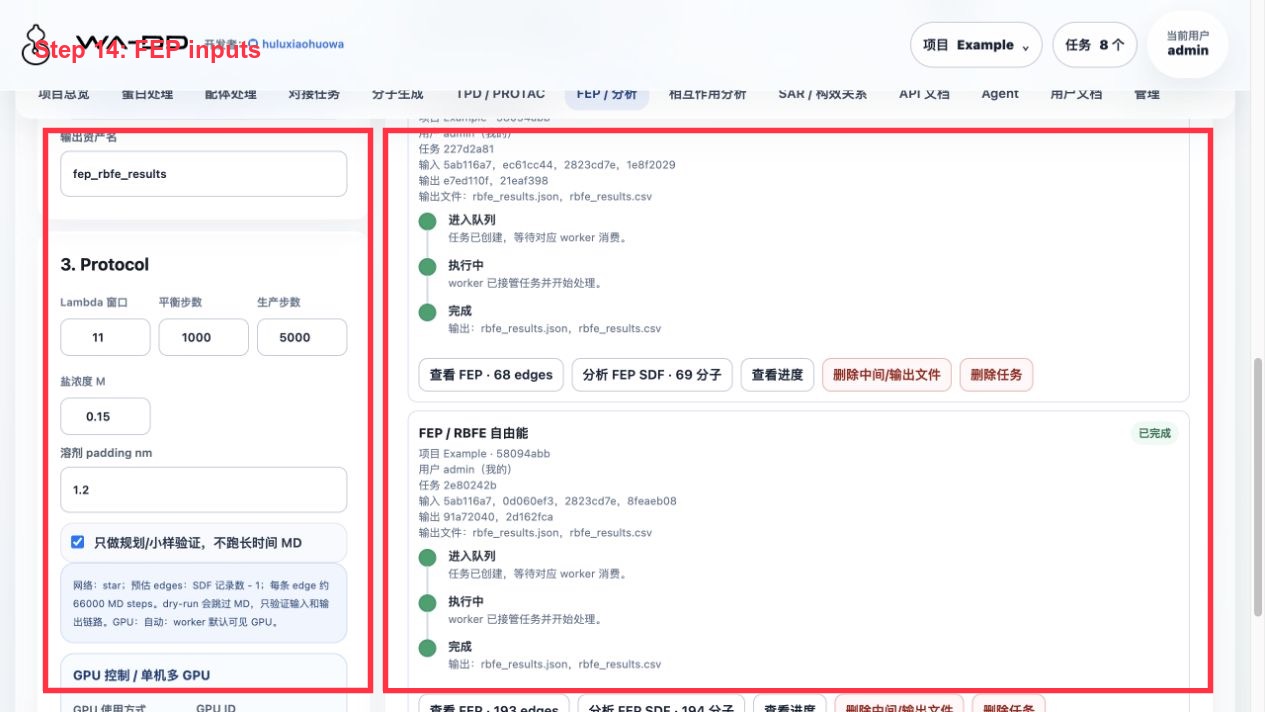
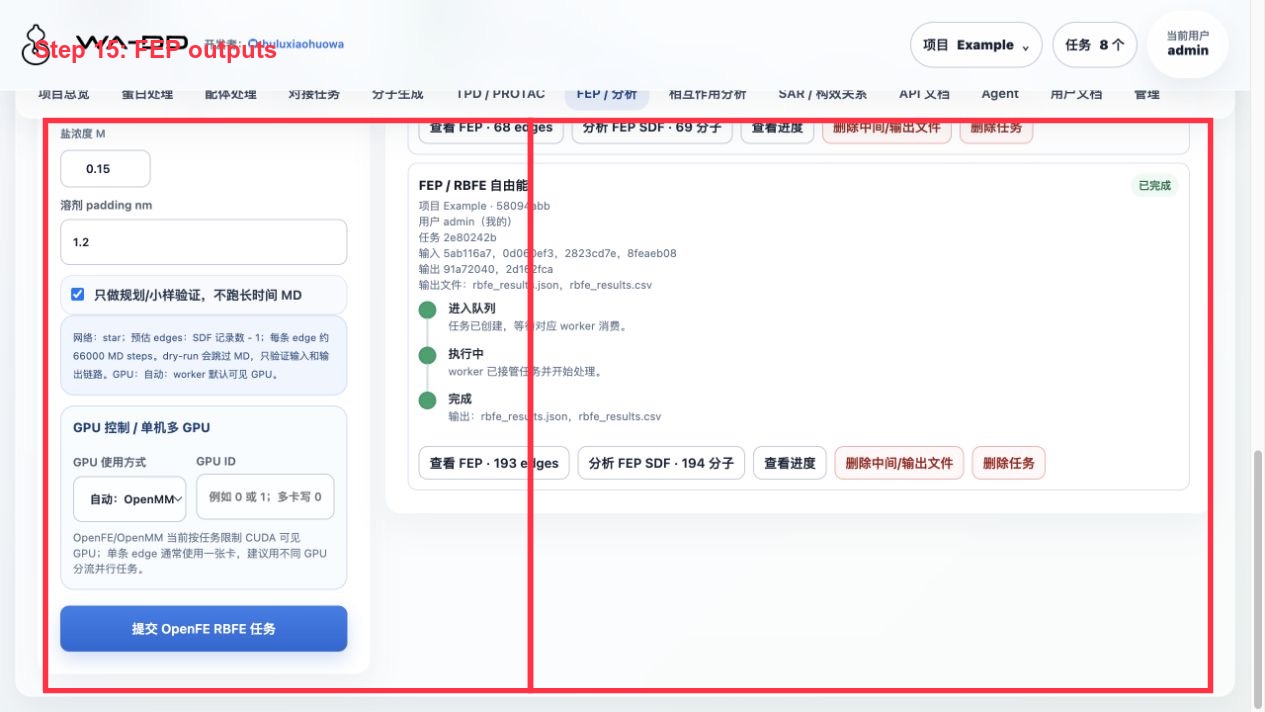
输入资产:
- 蛋白:
Example 1TA2 receptor prepared ligand-removed - 口袋:
Example 1TA2 176 binding pocket - 同系物对接 pose library:
Example 1TA2 congeneric Uni-Dock screening result docked pose library - de novo 对接 pose library:
Example 1TA2 PocketXMol de novo Uni-Dock result docked pose library
本次验证输出:
- 同系物库:
Example 1TA2 congeneric docking-pose RBFE plan clean fep_result:193 条 planned edgefep_output:Example 1TA2 congeneric docking-pose RBFE plan clean annotated SDF,194 条 SDF 记录- de novo 库:
Example 1TA2 de novo docking-pose RBFE plan clean fep_result:68 条 planned edgefep_output:Example 1TA2 de novo docking-pose RBFE plan clean annotated SDF,69 条 SDF 记录
结果怎么看:
- 点击
查看 FEP · N edges查看网络/edge 表。dry-run 结果显示planned,用于确认 ligand map,不代表真实 ΔΔG。 - 点击
分析 FEP SDF · N 分子会把派生 SDF 载入相互作用分析,结构、docking score 和 FEP 字段可一起查看。 - 在配体处理页面中,
fep_output分类可作为普通 SDF 资产加载 2D/3D、排序和导出。
当前限制:
- FEP worker 现在要求
reference_ligand是输入 SDF 内的真实记录名。单独提取的参考配体资产不能直接作为跨资产 reference 传入;如果需要严格使用独立参考资产,需要在 FEP 接口增加reference_ligand_asset_id并由 worker 合并/映射。 - dry-run 不运行 OpenMM 生产模拟,因此不会产生真实 ΔG/ΔΔG 数值或轨迹。正式生产任务会更耗时,并使用 GPU。