Projects and Assets
Role
Projects separate research contexts for one user; assets are reusable inputs, outputs, and intermediate files.
Inputs
- project name
- protein, ligand, pocket, docking results, and other assets
Outputs
project_idasset_id- downloadable files
API / Automation
POST /api/v1/projects
GET /api/v1/projects
GET /api/v1/assets?project_id=<project_id>
PATCH /api/v1/assets/{asset_id}
POST /api/v1/assets/{asset_id}/copy
DELETE /api/v1/assets/{asset_id}
When copying an asset to another project, the web UI selects the target project by project name; the API uses the target project_id.
Server6 Example: How the Project Overview Inspects the Complete Workflow
This example uses the server6 deployment page http://123.207.15.89:45103, with the project name Example.
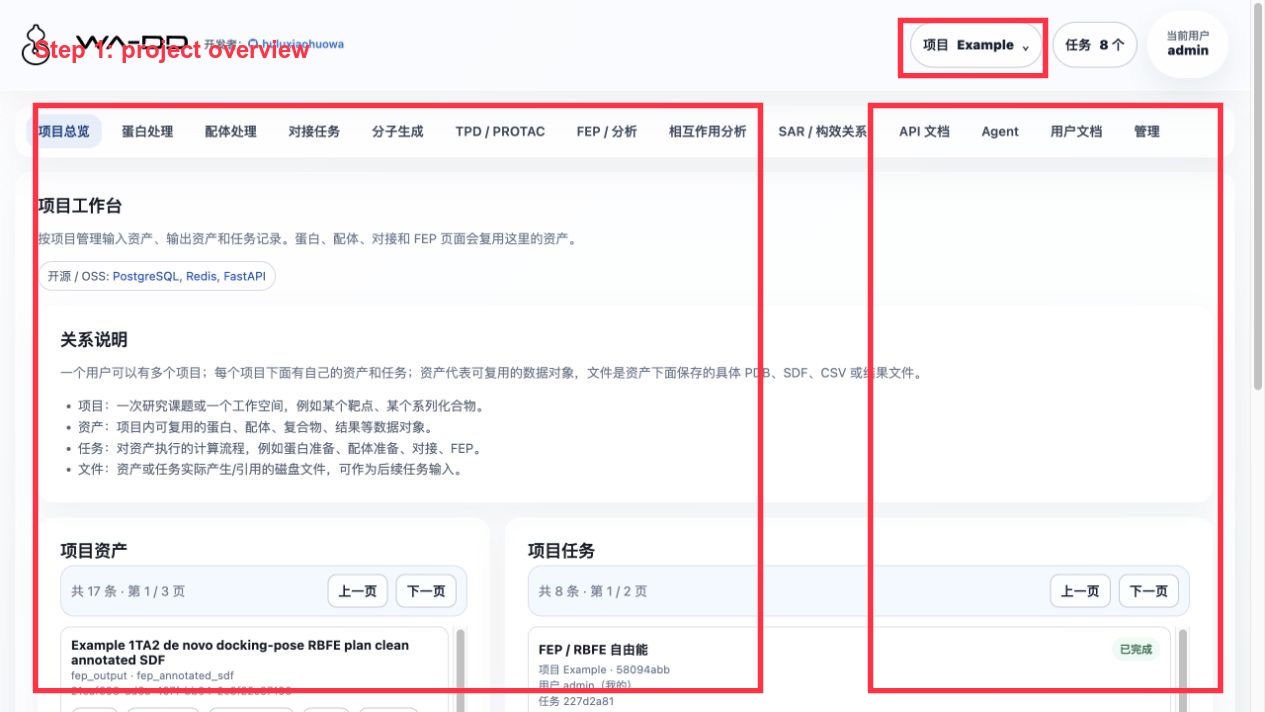
Inspection order:
- Select
Examplefrom the project menu in the upper-right corner. - In "Project Assets", confirm that the key assets exist:
- Original protein:
Example 1TA2 thrombin complex - Reference ligand:
Example 1TA2 reference ligand 176 - Pocket:
Example 1TA2 176 binding pocket - Prepared protein:
Example 1TA2 receptor prepared ligand-removed - Prepared congeneric library:
Example 1TA2 congeneric 72 analog library prepared for docking - PocketXMol generated library:
Example 1TA2 PocketXMol de novo generated ligands - Two sets of Uni-Dock pose library
- Two sets of FEP
fep_resultand two sets offep_output - In "Project Tasks", confirm that all tasks are "Completed". This example includes protein preparation, ligand preparation, molecule generation, two docking runs, and two FEP runs.
- When there are too many assets and tasks, use pagination to view them; you do not need to remember raw IDs. In practice, prioritize asset name, type, and source.
Result interpretation:
fep_outputis a loadable SDF asset derived from FEP.docking_pose_libraryis the merged conformation SDF asset of a docking task.- If a task fails and produces failure assets, delete the failed task and the intermediate/output files to avoid polluting the Example project.