Docking Tasks
Role
Docking tasks combine receptor, ligand, and pocket assets to predict binding poses, screen candidates, and seed FEP. The default docking engine is Uni-Dock GPU with Vina/Vinardo scoring.
Inputs
prepared_proteinasset (protein,complex, and MD-derivedmd_structureassets are also accepted as receptor)ligandorprepared_ligandassetpocketasset, or apocket_ensemble(dynamic pocket ensemble) asset from GROMACSpocket_discovery: with an ensemble selected, no separate receptor is required and each pocket uses its own cluster representative structure as receptor- Uni-Dock is a traditional docking engine and does not require neural network model files
Outputs
JobOutresultasset: includes the Uni-Dock report, pose table, worker log, and task summary.- 1
prepared_ligand_library/docking_pose_library: all successful poses from this task are merged into one SDF. Each SDF record keeps molecule name, SMILES, docking score, and pose index, and can be selected, sorted, exported, or reused by interaction analysis/FEP. - When a
pocket_ensembleis used, the task fans out over "pocket x ligand" runs while still merging all poses into one SDF; each record additionally carriesWA_DD_POCKET_INDEX / POCKET_LABEL / POCKET_CENTER / POCKET_CLUSTER_POPULATIONproperties, and the report and pose table add cross-pocket consensus ranking (best score, best pocket, and pocket-hit coverage per molecule). Interaction outputs are generated per pocket.
Workflow
- Import or prepare the receptor in Protein Processing, then save a
pocketasset from a co-crystal ligand or a manual box. - Import SDF/SMILES or draw molecules in Ligand Processing. Select the export profile by target use:
- Uni-Dock/Vina: add hydrogens, generate 3D conformers, assign Gasteiger charges, and prepare PDBQT.
- FEP/MD: keep 3D conformers and force-field handoff metadata.
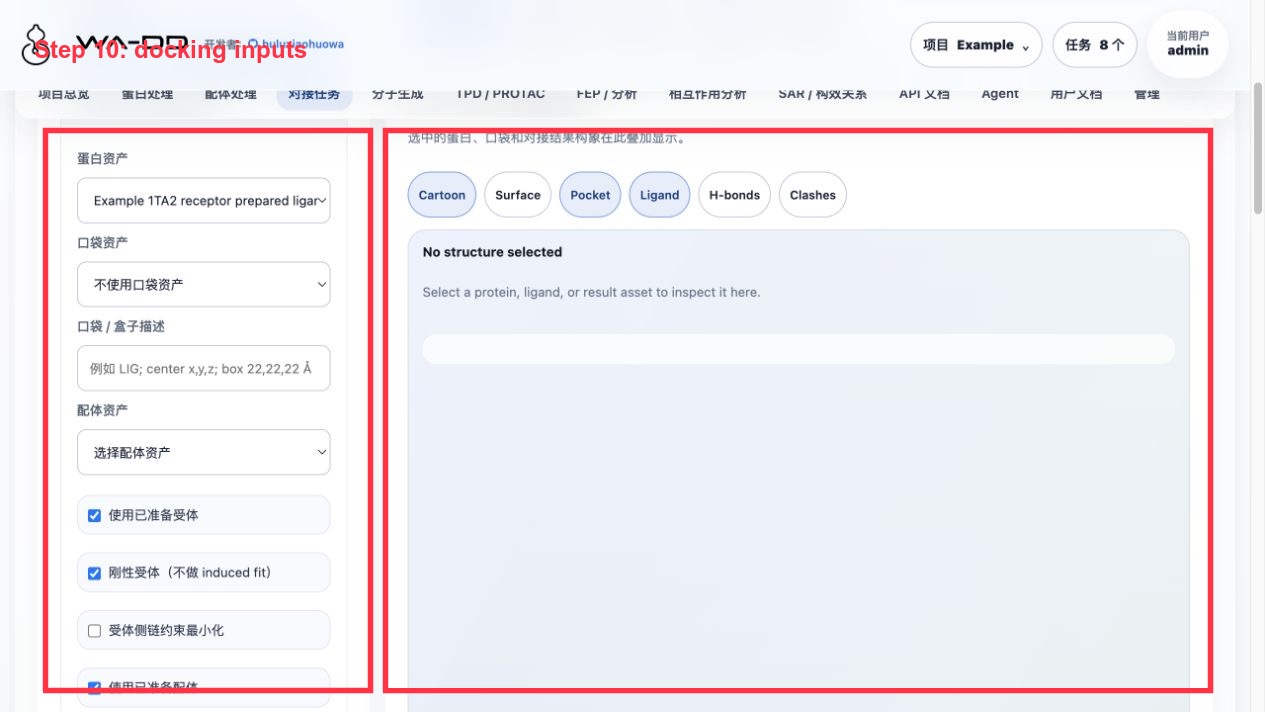
- In Docking Tasks, select receptor, pocket, and ligand from dropdowns. The pocket dropdown accepts both standard
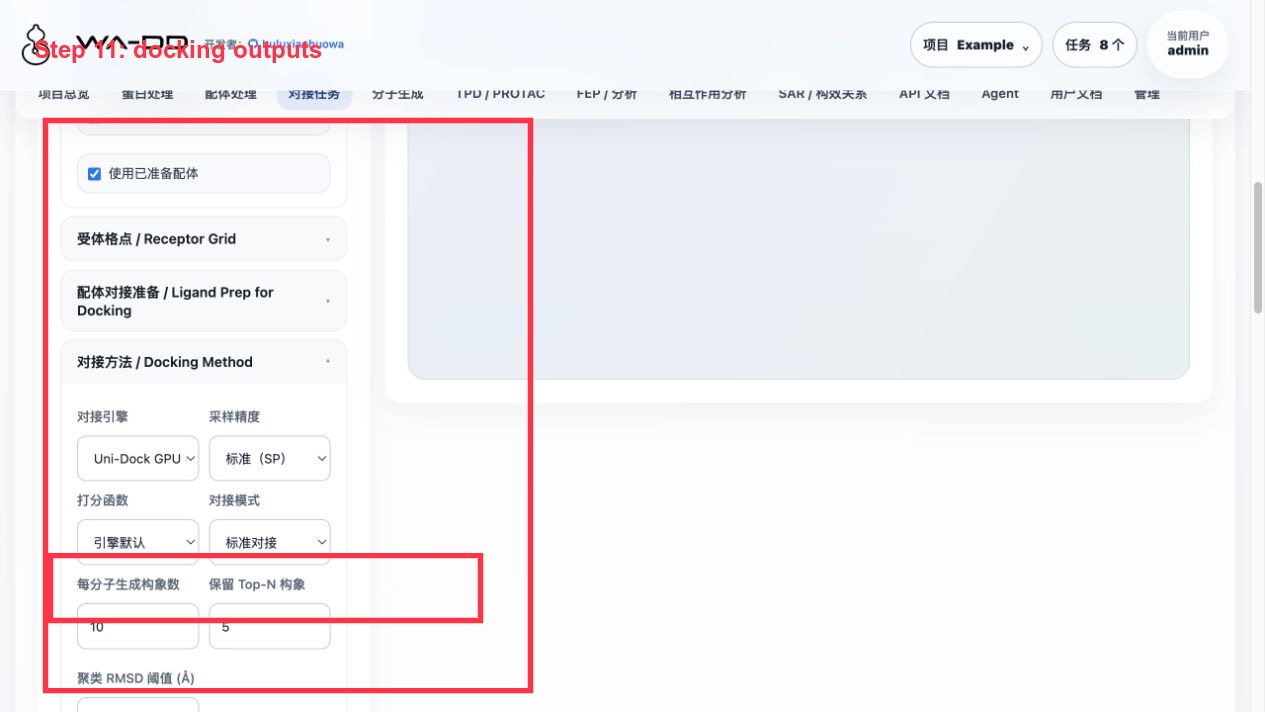
pocketand dynamic pocket ensemble (pocket_ensemble) assets; when an ensemble is selected the receptor can be left empty. The page calls/api/v1/docking/compatibilityto check whether the current combination is runnable. - Choose the docking method (default: Uni-Dock GPU) and related parameters.
- Click
Submit Docking Task. The system creates adockingjob and dispatches it to the Uni-Dock worker. - Track step-by-step progress in the Task Center. After completion, go to the output asset to download structures/reports, or reuse the result asset in analysis/FEP.
API / Automation
GET /api/v1/docking/compatibility
POST /api/v1/jobs
GET /api/v1/jobs?project_id=<project_id>
GET /api/v1/jobs/{job_id}/events
GET /api/v1/models/pocketxmol
For automation, call the compatibility endpoint first. Submit a docking task only when compatible=true. After completion, read output_asset_ids and download structures/reports from the asset file endpoints.
Server6 Example: 1TA2 Congeneric Library and de novo Generated Ligand Docking
This example was completed in the Example project on server6, using the 176 ligand pocket of 1TA2 thrombin.
Key steps:
- For the protein, select
Example 1TA2 receptor prepared ligand-removed. - For the pocket, select
Example 1TA2 176 binding pocket. - The ligand library can be one of:
Example 1TA2 congeneric 72 analog library prepared for dockingExample 1TA2 PocketXMol de novo generated ligands- For the docking method, choose Uni-Dock; this example uses
pose_per_ligand=3,keep_top_poses=1,cpu_threads=4, and GPU devicecuda:0. - After the task completes, use:
View Report · N poses: open the pose table and rank by docking score.Analyze Pose Library · N poses: automatically load this task's merged SDF into the interaction analysis page.
Validation output for this run:
- Congeneric library: 66 input ligands, 194 poses, 0 failed/skipped; the pose library asset is
Example 1TA2 congeneric Uni-Dock screening result docked pose library. - de novo generated ligands: 23 input ligands, 69 poses, 0 failed/skipped; the pose library asset is
Example 1TA2 PocketXMol de novo Uni-Dock result docked pose library.
Result interpretation:
- A more negative docking score generally indicates better Vina scoring, but it is not experimental binding free energy.
- A single task outputs only one merged SDF; it no longer splits each pose into a pile of assets. To compare results, sort by score in the pose table or interaction analysis and view them with single/multi-selection.
- If
View Reportdoes not respond or reports an error, first check whether the task has producedunidock_pose_table.csvandunidock_docked_poses.sdf; these two files are the source of the report and 3D analysis.