Agent workbench (Pi / Prime)
The Agent page supports personal CADD sessions powered by Pi Agent Core or Prime Agent. Each WA-DD user can only see their own sessions, context, and model configuration; both runtimes share one encrypted model configuration. The former JCode runtime has been retired; historical JCode sessions remain viewable but can no longer send messages.
Each request carries the project currently selected in the page. For ligand discovery, the Agent first queries ligand-specific assets in that project and then reads molecules and SMILES from the selected asset; it does not infer results from a truncated general asset list.
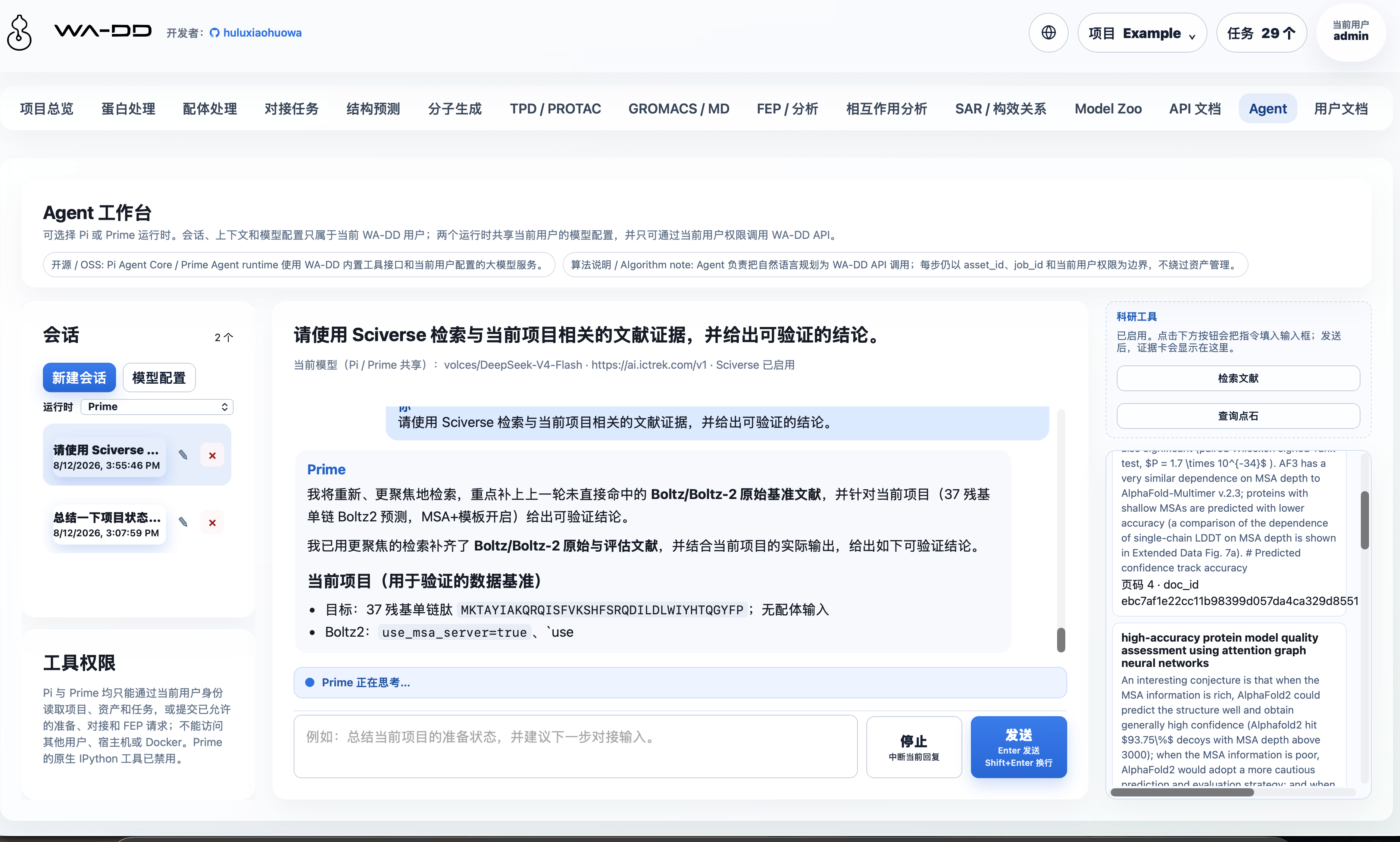
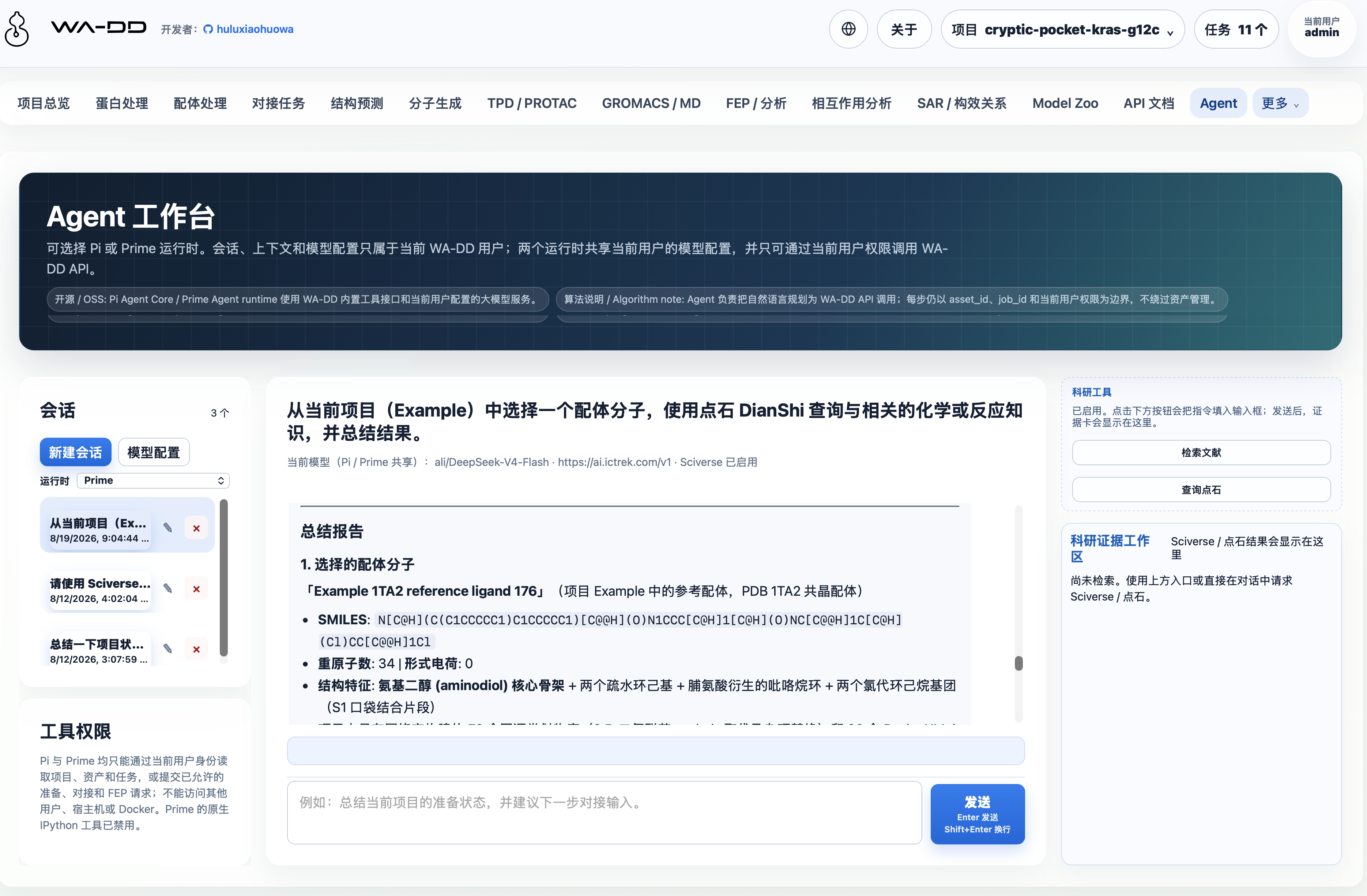
On the left side of the page you can create, rename, or delete personal sessions, and open model configuration; the conversation on the right combines the proteins, ligands, pockets, and task results in the current project, asks for necessary inputs as needed, and then calls the allowed tools. Tool permissions match the current user and cannot access other users' projects or assets.
The first time you open the page, you will be asked to fill in the model endpoint, model name, and API Key for the current account. Each user's API Key is encrypted and stored independently, and the page never echoes it back. When editing later, an empty secret keeps the existing saved value and never clears it. You may optionally provide one Sciverse Key; the same key is used for Sciverse and DianShi and is decrypted only while the current user's Agent invokes those tools.
With Sciverse configured, a dedicated research-evidence column on the right shows Search literature and Query DianShi actions. They fill the corresponding instruction into the composer; after it is sent, the Agent can retrieve citable literature evidence and use DianShi substance, reaction, similarity, and reference tools. Title, snippet, page, and doc_id cards scroll inside that column rather than covering the conversation. SeqStudio currently exposes online/local workflows only and has no public HTTP API, so its key is not represented as a callable integration.
Pi and Prime only expose the controlled wa_dd_api tool: it reads projects, assets, and tasks within the current user's permissions, and submits allowed preparation, docking, or FEP API requests. Prime's built-in IPython and shell tools are disabled, and the Prime worker has no host directory, Docker socket, or other users' tokens.
While a reply is streaming, the composer supports the message queue: pressing Enter sends a steering message that is injected right after the current turn's tool calls finish; pressing Alt+Enter sends a follow-up message that is delivered only after the current run settles. The "steering / follow-up delivery" selectors below the input choose one-at-a-time (the default, best for sequential dependent instructions) or all (batch delivery for many independent tasks); the choice is remembered in the browser and applies immediately to a running session. Pending messages are listed in the queue panel under the conversation and can be cleared with one action before delivery.
Pi reuses the existing WA_DD_DATA_HOST_DIR mount; encrypted configuration and session context mirrors are persistently saved to /data/pi inside the container, which corresponds to ${WA_DD_DATA_HOST_DIR}/pi on the host. PostgreSQL remains the authoritative record for permission checks and queries.
On first startup, a read-only deployment encryption master key is generated in this persistent directory. Typically no environment variable needs to be set; if you want it managed by a key management system, you may optionally set WA_DD_PI_CONFIG_ENCRYPTION_KEY to override the auto-generated key. It is not the user's model API Key.
Build the Pi worker:
./build_image.sh --profile amd --component pi-agent