Molecule Generation
Purpose
The molecule generation page uses PocketXMol to generate 3D ligand conformations based on saved pocket assets. The results are saved as reusable assets that can be used for interaction analysis, docking, and FEP.
Currently available modes are pocket-based de novo generation and Fragment growing.
Scaffold hopping and Linker design require users to select retained scaffolds, fragment groups, and linker anchor points within the molecule; the page does not yet provide an atom/anchor selector, so these modes are not open for submission.
Prerequisites
Before starting, prepare the following in the same project:
- Protein asset:
protein,prepared_protein, orcomplex. - Pocket asset:
pocket, must includecenter,box_size, andpocket_structure. - PocketXMol model: the path is fixed at
/modelhub/export/ms/huluxiaohuowa/pocketxmol/current. Do not manually change it to another directory, or ModelHub / Model Zoo will not be able to recognize and update it. Prefer downloading and updating the model from theModel Zoopage; the small card on this page still shows whether the model is ready.
The pocket asset should simultaneously serve three types of use cases:
- Vina/AutoDock/Uni-Dock: uses
centerandbox_sizeas the docking box. - PocketXMol: uses
centerandgeneration_radiusas the generation region. - Visualization: uses the
pocket_structurePDB to display residues near the pocket.
How to fill in page fields
Protein asset
Select the protein or prepared protein from the current project. It is recommended to use the prepared_protein output from the protein preparation step, so that subsequent docking and FEP can reuse the same receptor asset.
Pocket asset
Select the pocket asset created on the protein preparation page or the protein component page. The pocket asset provides:
- docking box:
center+box_size - PocketXMol radius:
generation_radius - pocket visualization:
pocket_structure
If there are no selectable pockets, you need to go back to the protein page to create a pocket asset first.
Reference ligand / fragment
Select from the current project's ligand / prepared_ligand / prepared_ligand_library assets; no need to manually enter IDs.
Usage rules:
pocket-based de novo generation: no reference ligand is required.Fragment growing: a reference ligand or fragment asset must be selected.
After selecting a reference ligand asset, the page loads the specific molecules/conformations within that asset and lists them in the Reference molecule / conformation dropdown with #index, name, and SMILES. The preview box displays the currently selected molecule's index, name, heavy atom count, and SMILES.
Fragment growing currently uses the semantics of "the entire selected molecule as the fragment": the worker reads the specified molecule/conformation from the selected asset, retains all its heavy atoms, and then generates the extension. Users do not need to know atom indices or understand atom numbering in SMILES.
If you only want to grow a specific local fragment, you should first draw or upload that fragment as a separate ligand asset on the ligand page, then come back here and select this fragment asset.
Model status
The model card on the molecule generation page displays:
- Whether the model is ready;
- ModelHub-compatible path;
- Occupied size;
- Latest snapshot;
- Whether the required
pocketxmol.ckptandtrain.ymlexist.
Model download and update should normally be done from the Model Zoo page. Model Zoo writes the model into the same structure as VAI ModelHub:
/data/export/ms/huluxiaohuowa/pocketxmol/snapshots/<snapshot>
/data/export/ms/huluxiaohuowa/pocketxmol/current
In web and worker containers, the same host directory is mounted as:
/modelhub/export/ms/huluxiaohuowa/pocketxmol/current
Download and update are global model operations that require administrator privileges.
Generation mode
Submittable modes:
pocket-based de novo generation: uses only the protein and pocket to generate new molecules from the pocket region.Fragment growing: uses a reference fragment/ligand as the retained portion and extends new structures in the pocket environment.
Modes not yet available:
Scaffold hopping: requires selecting the scaffold portion to retain/replace.Linker design: requires selecting two or more fragment groups and linker anchor points.
Generated ligand asset name
It is recommended to clearly indicate the target, pocket, and parameters, for example:
tutorial_1A2C_22A_PocketXMol_20
After generation is complete, the following will be created:
- 1
prepared_ligand_library: contains the batch hydrogenated SDF, original SDF, pocket PDB, report, and interaction preview table. - Multiple
prepared_ligandassets: one independent asset per generated conformation, which can be directly used for docking, FEP, and interaction analysis.
Generation count
Controls the total number of candidate molecules to generate. Mainly affects total runtime, with minimal impact on peak GPU memory.
Batch size
GPU/memory sensitive. A larger batch size generates more molecules simultaneously per round, which may be faster, but also consumes more GPU memory.
Recommendations:
- 8-12: more stable, suitable for trial runs.
- 20: default batch size, suitable for GPUs with 16GB or more.
- 50+: only recommended when memory is sufficient and the pocket is confirmed to be small.
Sampling steps
GPU/runtime sensitive. Higher step counts increase the generation time per molecule. The change in peak memory is usually smaller than that of batch size and pocket radius.
Recommendations:
- 20: smoke test or workflow validation.
- 100: default production generation.
- 200+: slower, suitable when more thorough sampling is needed.
PocketXMol radius Å
GPU/memory sensitive. When left blank, uses generation_radius from the pocket asset, or derives it from box_size.
A larger radius means the model sees a larger pocket region, increasing computation and memory usage. It is generally not recommended to increase it blindly; if you need to cover a larger binding region, first confirm whether the pocket definition is reasonable.
How to use output assets
After generation is complete, open the results on the molecule generation page to see:
- Residues near the pocket
- Generated 3D ligand conformations
- Geometric distance interaction preview
- The generated library asset and each molecule record in the SDF
Subsequent usage:
- Interaction analysis: select the corresponding
pocketorprepared_proteinas the receptor context, then select the generatedprepared_ligand_library, and then single- or multi-select molecule records from it. - Docking: on the docking page, select the generated
prepared_ligandorprepared_ligand_libraryas the ligand asset. - FEP: prefer selecting an already-docked
docking_pose_library; you can also select a prepared ligand library as a candidate input.
If you just want to check whether the pocket matches the generated conformations, prefer selecting the pocket asset used during generation in interaction analysis; if you want to see the full protein background, select the corresponding prepared_protein.
Verified tutorial example
In the tutorial project, a small-batch generation has been completed using the 1A2C pocket:
- Project:
tutorial - Input protein:
tutorial 1A2C receptor all-hetero-removed PDBQT-ready - Input pocket:
tutorial 1A2C 22A ligand-site pocket - Task:
tutorial PocketXMol smoke 3 ligands 20260728 retry3 - Output: 1
prepared_ligand_librarycontaining 3 SDF molecule records - Generated conformations have been hydrogenated; asset metadata is tagged
prepared_for: docking, wa-dd, fep_md
Server6 Example: 1TA2 pocket de novo generation
This example was completed in the Example project on server6. The input is prepared 1TA2 thrombin and the pocket where the 176 ligand is located.
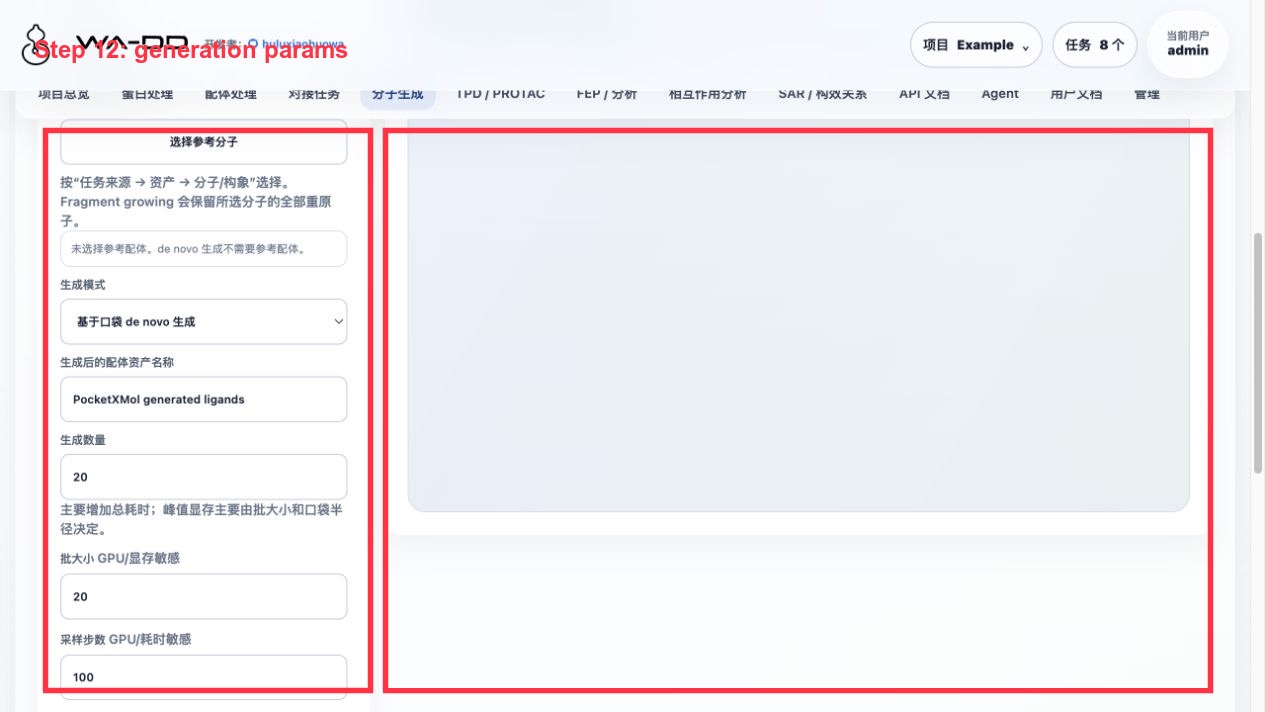
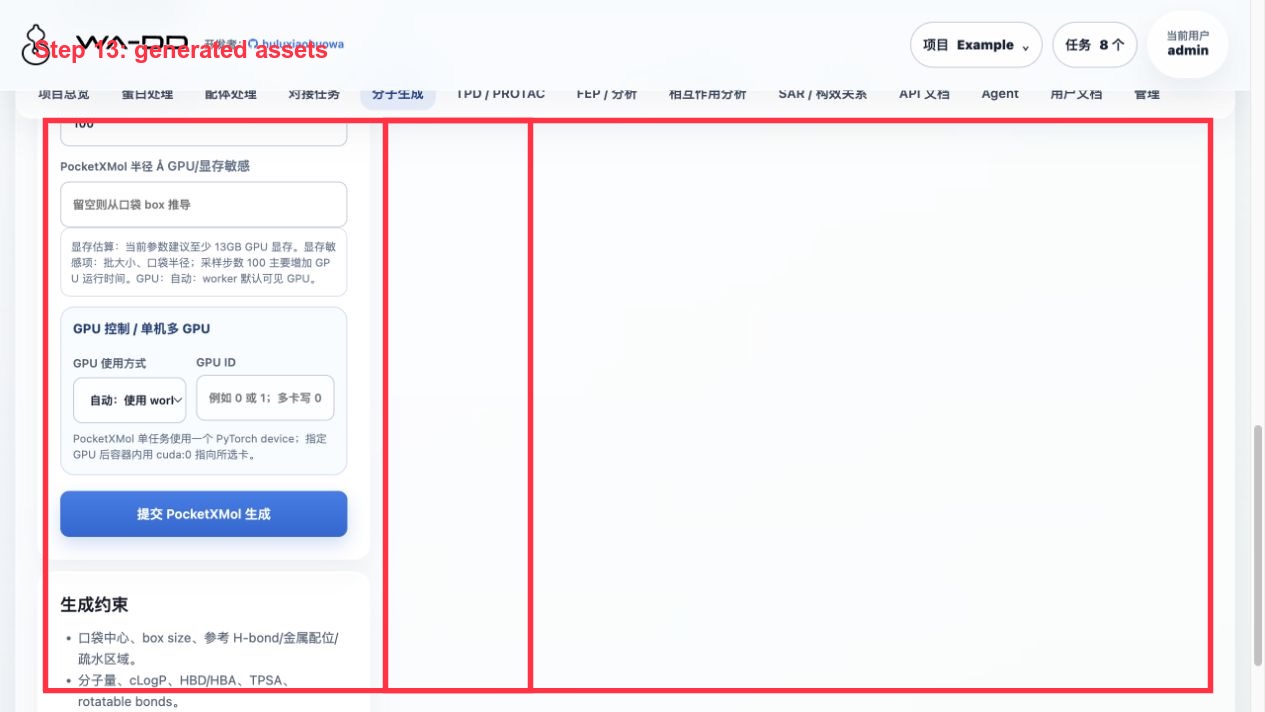
Operation steps:
- Enter "Molecule Generation".
- For protein, select
Example 1TA2 receptor prepared ligand-removed. - For pocket, select
Example 1TA2 176 binding pocket. - For mode, select
pocket-based de novo generation. - Parameters for this example: generation count 24, batch size 8, mean atoms 28, min atoms 10, sampling steps 100, PocketXMol radius 12 Å, GPU
cuda:0. - Keep
prepare_for_docking=true, submit, and wait for the task to complete.
Validation output for this run:
- Requested 24 molecules, 23 succeeded.
- Output asset:
Example 1TA2 PocketXMol de novo generated ligands. - Output file:
generated_ligands_h.sdf. - The generated SDF has explicit hydrogens; the page displays the
heavy / Hcount for each molecule.
Result interpretation:
- PocketXMol generates 3D conformations; when
prepare_for_dockingis enabled, the worker saves the hydrogenated SDF during the post-processing stage. - Molecule generation itself does not produce a docking score; to compare molecules, you need to submit the generated assets to Uni-Dock, obtain docking scores, and then rank them in ligand processing or interaction analysis.
- If a generated asset is visible in ligand processing but not in interaction analysis, first refresh the page and confirm that the asset category is ligand / prepared ligand / prepared ligand library.
FAQ
Why can't I select scaffold hopping / linker design?
These two modes are not tasks that can be safely defined by simply "selecting a ligand asset." They require users to click and select in a 2D/3D molecular view:
- Which atoms/fragments to fix;
- Which atoms/fragments to replace or connect;
- Linker anchor points.
Until the atom/anchor selector is complete, the page does not open these two modes to avoid ambiguous generation task semantics.
Why can generation results be seen on the molecule generation page but not in interaction analysis?
Two things need to be confirmed:
- The task has completed and the output asset has been refreshed into the current project asset list.
- An appropriate receptor context was selected in interaction analysis: for generation results, select the corresponding
pocket, then select the generatedprepared_ligandconformation.
Can generated molecules be docked directly?
Yes. The generation worker saves the results as a hydrogenated SDF and creates a prepared_ligand_library asset. The docking page can directly select this asset; the worker internally splits each SDF record for docking, and the output is still a merged pose library SDF.
If a downstream tool requires PDBQT, the docking/ligand preparation workflow converts or validates it at submission time; users do not need to manually modify files.